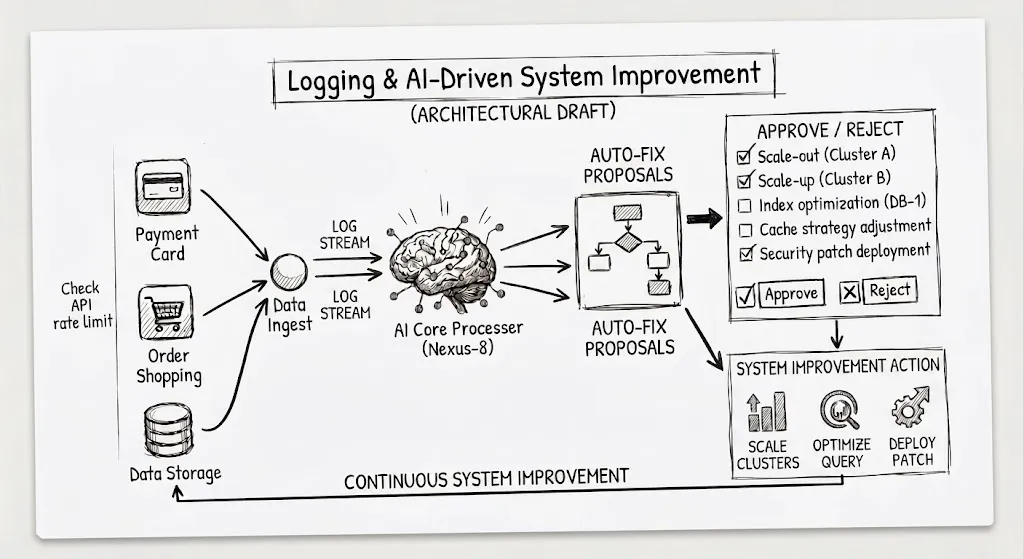
Logging is one of the most fundamental components of a software system.
When a system encounters an error, the first thing developers usually do is open the logs and try to understand what happened.
- Where did the request fail?
- Which service caused the error?
- When did the error start?
- How many requests were affected?
- Is this a new issue, or has it happened before?
All of these questions require information from the logging and observability system. But the way we build software is changing.
AI today can do more than just write code. It can read a codebase, analyze logs, investigate incidents, identify root causes, create pull requests, and propose ways to improve a system.
This leads to an interesting question:
If AI also needs to use logs to understand and improve a system, how should we design our logging system?
The answer is not collect as many logs as possible.
The more important question is:
How can we provide AI with enough information, the right information, and enough context to understand what is happening inside the system?
The Basics of a Logging System
Before talking about AI, we need a solid logging foundation.
A basic logging system does not have to be complicated. At its core, it should help us answer a few questions:
- What happened?
- When did it happen?
- Where did it happen?
- Which request or operation was involved?
- How severe was it?
- Is it related to another component or service?
Log What Matters
Not every line of code needs a log.
A good log should contain useful information that helps us understand the behavior of the system.
For example:
{
  "level": "ERROR",
  "event": "payment_failed",
  "service": "payment-service",
  "operation": "create_payment",
  "error_type": "TimeoutError"
}
From this log, we know that the payment failed, which service was involved, and what type of error occurred.
The goal of logging is not to generate as much data as possible.
The goal is to generate the right data.
Structured Logging
A good logging system should use structured logs instead of free-form text.
For example:
Payment failed for user 123is harder to search and analyze than:
{
  "event": "payment_failed",
  "user_id": "123",
  "payment_id": "456",
  "error_type": "TimeoutError"
}
When logs have a clear structure, we can easily:
- search
- filter
- aggregate
- correlate
- analyze with code
- analyze with AI
This becomes even more important as the system grows.
Context Matters More Than the Number of Logs
A simple log like:
ERROR: Request faileddoes not tell us much.
We need more context:
{
  "timestamp": "2026-09-04T10:00:00Z",
  "level": "ERROR",
  "service": "payment-service",
  "environment": "production",
  "request_id": "req_123",
  "trace_id": "trace_456",
  "operation": "create_payment",
  "error_type": "TimeoutError",
  "dependency": "stripe",
  "duration_ms": 10234
}
Now we know:
- which service failed
- which environment it happened in
- which request was involved
- which operation was running
- which dependency was involved
- what type of error occurred
- how long the request took
This is the kind of information that is actually valuable for investigation.
Correlation
In a distributed system, a single request may pass through many services:
API Gateway
     ↓
Order Service
     ↓
Payment Service
     ↓
Database
     ↓
External API
If each service generates logs independently, finding the root cause becomes difficult.
That is why we need information such as request_id and trace_id to connect events together.
We can then see:
trace_id = abc123

API Gateway
    ↓
Order Service
    ↓
Payment Service
    ↓
Stripe API
    ↓
Timeout
Instead of seeing five separate logs, we see one complete request flow.
Logs Are Not Everything
Logs are only one part of observability. Typically, we have three types of data, each answering a different question:
| Type | Question it answers | What we might see for the same incident |
|---|---|---|
| Logs | What happened? | Payment requests are frequently timing out |
| Metrics | How often is it happening, and how severe is it? | Error rate increased from 0.2% → 8% |
| Traces | Where did it happen in the request flow? | Most of the latency comes from the external payment API |
When combined, these three provide a much more complete picture of the system.
What Does a “Good Enough” Logging System Look Like?
A good logging system can be summarized with a few principles:
the right information, enough context, consistent formatting, correlatable data, searchability and analyzability, and reliability without creating security or cost problems.
This provides a solid foundation for developers.
But if we want AI to use the system, we need to go further.
When AI Becomes a Consumer of Logs
In the traditional model:
System
   ↓
Logs
   ↓
Developer
   ↓
Investigation
   ↓
Fix
The developer reads the logs and performs the entire reasoning process.
In a system with AI:
System
   ↓
Logs / Metrics / Traces
   ↓
AI
   ↓
Investigation
   ↓
Proposal
   ↓
Developer Review
   ↓
Fix
AI becomes another consumer of observability data.
And this changes how we should think about logging.
AI Does Not Need More Logs. AI Needs Enough Context.
This is probably the most important point.
When an incident occurs, we may have millions of logs.
But if those logs lack context, AI still cannot understand what is happening.
For example:
ERROR: Request failedAI does not know:
- Which request?
- Which service?
- Which user?
- Which operation?
- Which dependency?
- How many requests were affected?
- When did the problem start?
- Was there a recent deployment?
On the other hand, if the logs contain enough context, AI can start reconstructing the incident.
For example:
10:01:02
request started
request_id=req_123

10:01:03
order created
service=order-service

10:01:04
payment started
service=payment-service

10:01:14
payment timeout
dependency=stripe
duration=10s

10:01:15
request failed
AI can see a sequence:
Request
  ↓
Create Order
  ↓
Create Payment
  ↓
Stripe timeout
  ↓
Request failed
This is the difference between logs collection and system understanding.
AI Needs Consistency
Another important issue is consistency.
If every service uses different names:
payment_timeout
stripe_timeout
external_timeout
payment_provider_error
AI has to guess whether they represent the same type of problem.
Instead, we can standardize them:
error_type = DEPENDENCY_TIMEOUT
dependency = stripe
service = payment-service
AI can then easily recognize:
There are multiple
DEPENDENCY_TIMEOUTevents related tostripe.
From there, it can start looking for patterns.
This leads to an important principle:
AI-ready logging requires more than structured logs. It requires semantic consistency.
Field names, events, error types, and data representations should follow a clear contract.
Observability as a Contract
This is where logging starts to take on a new role.
Previously, logging was often treated as an implementation detail of an application.
But if AI depends on logs to understand the system, logs become an interface between the system and AI.
Application
     ↓
Observability Contract
     ↓
Logs / Metrics / Traces
     ↓
AI
This contract can define a common set of fields:
service, environment, request_id, trace_id, operation, event, error_type, dependency, duration, status.
Not every service has to log exactly the same set of fields.
But important information should have a consistent representation.
This means AI does not have to learn how to interpret logs differently for every service.
AI Needs Historical Context
A single log from the present is sometimes not enough to find the root cause.
AI needs the ability to look at historical data.
For example, suppose the error rate for the same endpoint was 0.2% last month, 0.3% yesterday, and 8% today.
AI can start asking:
- When did the problem begin?
- Was there a deployment before it happened?
- Did any configuration change?
- Has this problem happened before?
- How did we solve it last time?
At this point, logs are no longer just:
“Record of what happened.”
They become part of the system knowledge.
What Should AI Be Allowed to Do?
An AI system with access to observability data can support many steps in the engineering workflow:
| Step | What AI does | Example |
|---|---|---|
| 1. Detect | Detect anomalies | Error rate suddenly increases |
| 2. Investigate | Narrow down the scope | Errors related to payment-service |
| 3. Correlate | Connect the pieces | Error → Request → Trace → Deployment → Dependency |
| 4. Identify | Form a hypothesis | Stripe API latency increased after deployment X |
| 5. Propose | Suggest a fix | Increase timeout, add exponential backoff, circuit breaker |
| 6. Implement | Create code changes or a pull request | |
| 7. Verify | Observe the system after deployment | Timeout rate 8% → 1% |
AI does not only find problems.
It can also monitor whether a solution actually improves the system.
But AI Should Not Make the Final Decision
This is a very important point.
The goal is not:
AI reads logs → AI automatically changes production.
A more realistic and safer model is:
              System
                 ↓
        Logs / Metrics / Traces
                 ↓
                AI
                 ↓
        Analyze / Investigate
                 ↓
         Propose a solution
                 ↓
             Developer
                 ↓
               Review
                 ↓
           Approve / Reject
                 ↓
               Deploy
AI is responsible for reasoning and execution support.
The developer remains responsible for judgment.
The developer can review:
- What evidence did AI find?
- What hypothesis is AI proposing?
- Which logs support the hypothesis?
- What changes are being proposed?
- What are the risks of the change?
The developer can then decide:
Approve or Reject.
This is a human-in-the-loop model.
From Incident Response to Continuous Improvement
The most interesting part happens when we do not use AI only for incident response.
We can use the same system to continuously improve the system.
For example, logs show that 30% of payment requests require a retry. AI investigates and discovers:
External API
      ↓
Intermittent timeout
      ↓
Retry
      ↓
High latency
      ↓
More timeout
AI proposes exponential backoff, a circuit breaker, and more appropriate timeout settings.
The developer reviews and approves the changes.
After deployment, the retry rate drops from 30% to 3%.
Now the observability system creates a feedback loop:
System
   ↓
Observe
   ↓
AI analyzes
   ↓
AI proposes improvement
   ↓
Developer reviews
   ↓
Change
   ↓
Deploy
   ↓
Observe again
   ↓
AI analyzes again
This is no longer just logging.
It is an engineering feedback loop.
Logging in AI-Native Engineering
If we look at the bigger picture, logging is only one part of a larger system.
             Running System
                    ↓
        ┌───────────┴───────────┐
        ↓                       ↓
      Code                Observability
                                ↓
                         Logs / Metrics / Traces
                                ↓
                               AI
                                ↓
                         Analyze / Investigate
                                ↓
                          Proposed Change
                                ↓
                            Developer
                                ↓
                              Review
                                ↓
                             Deploy
                                ↓
                         Running System
In this model, observability does not only help us understand what the system is doing.
It helps AI understand what the system is doing.
And once AI understands the system well enough, it can start participating in the process of improving it.
Conclusion
A good logging system is not the one with the most logs.
It is the one that provides:
- the right information
- enough context
- consistent formatting
- correlation capabilities
- historical information
- reliable data for analysis
For developers, this makes debugging easier.
But in AI-native engineering, we need to ask one more question:
Can AI understand the system from the information we are collecting?
If the answer is no, collecting more logs may not solve the problem.
We need to design observability data as a contract between the system and AI.
When we do that, AI can:
Detect
  ↓
Investigate
  ↓
Understand
  ↓
Propose
  ↓
Implement
  ↓
Verify
While developers remain responsible for:
Review
  ↓
Validate
  ↓
Decide
Ultimately, the goal is not to build a system where AI automatically fixes everything.
The goal is to build a system where:
AI has enough information to understand the problem, enough context to propose a good solution, and developers have enough evidence to decide whether that solution should be implemented.
When we achieve this, logging is no longer just a debugging tool.
It becomes part of the loop:
System → Observability → AI → Developer → System
And this is one of the important foundations of AI-Native Engineering.